Understanding Roles & Permissions
ReplyFabric has three roles — Owner, Mailbox Admin, and Mailbox Member — chosen when you invite a teammate. Role controls organization-level access; for Mailbox Admin and Mailbox Member, access to a specific mailbox's content is granted separately, per mailbox. Owner is the exception — it comes with full access everywhere, with nothing to assign.
Where to find them
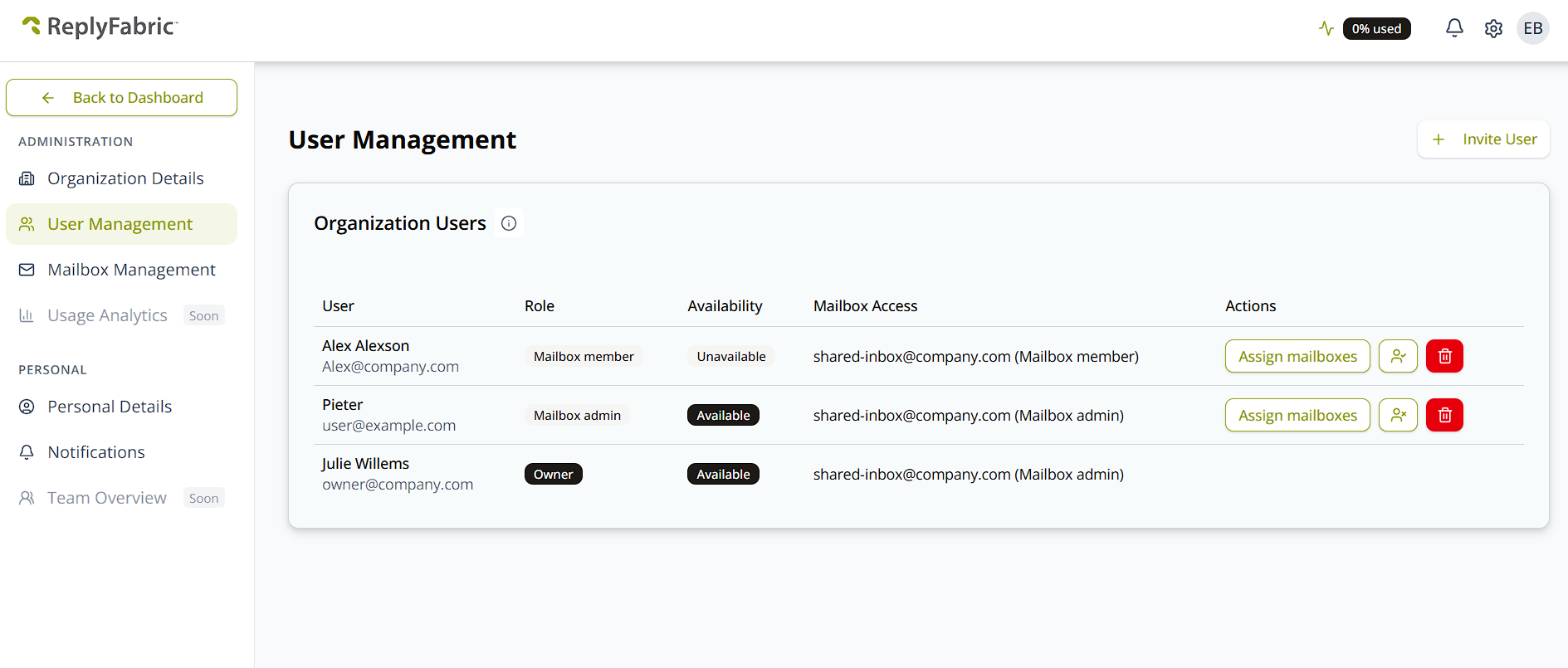
Everyone in the organization is listed under User Management, in the Administration section of the sidebar. The Organization Users table shows each person's Role, and Mailbox Access lists the mailboxes they've been given — each with the role they hold on that mailbox:
Owner
- Owns the ReplyFabric organization account.
- Has full, unrestricted access to every mailbox and every setting in the organization — no per-mailbox assignment needed, unlike Mailbox Admin and Mailbox Member.
- Manages billing and the subscription.
- Can invite other Owners and Mailbox Admins.
- Grants the one-time Entra admin consent for the ReplyFabric connector in Microsoft 365 organizations — see Connecting Microsoft 365 Shared Mailboxes for where that consent screen appears during setup.
Mailbox Admin
Mailbox Admin comes with meaningful organization-level access, not just mailbox configuration — broader than the name alone suggests.
Organization-level:
- Can edit Organization Details and their own Personal Details.
- Can manage billing.
- Can invite new users as Mailbox Admin or Mailbox Member, and delete pending invitations.
- Can delete active Admins and Members (not Owners).
- Can add a new mailbox to the organization, but cannot delete one.
- Can edit notification settings.
Mailbox-level (for any mailbox they're assigned to):
- Connects a shared mailbox via OAuth and manages it end-to-end.
- Configures categories, personas, contacts, and checklists.
- Can delete FAQs and checklists.
- Can add and delete languages in Mailbox Settings.
- Has full access to General Mailbox Settings except Reset to Template, which returns an insufficient-permissions error for this role.
- Can do everything a Mailbox Member can do.
Testing found Mailbox Admins get an insufficient-permissions error deleting a category or a Knowledge Base document, and modifying settings on the Interaction tab of Mailbox Settings — worth confirming against current behavior before relying on this, since it's a live testing finding rather than documented design.
Mailbox Member
- Works only inside mailboxes they're assigned to — no access to organization, billing, or user-management areas.
- Can process, refresh, and reprocess emails.
- Can edit categories, but cannot delete them.
- Can update a category's responsible person.
- Can manage FAQs, Knowledge Base documents, and intents, including deleting FAQs and intents.
- Can edit personas.
- Cannot delete other destructive shared structures — categories, personas, checklists, and contact lists stay Mailbox Admin-only to delete.
Assigning mailbox access
Because Mailbox Admin and Mailbox Member only reach the mailboxes they've been given, access is granted per mailbox rather than by role. Click Assign mailboxes on someone's row to open the picker, switch on the mailboxes they should have, and click Send Activation Link:
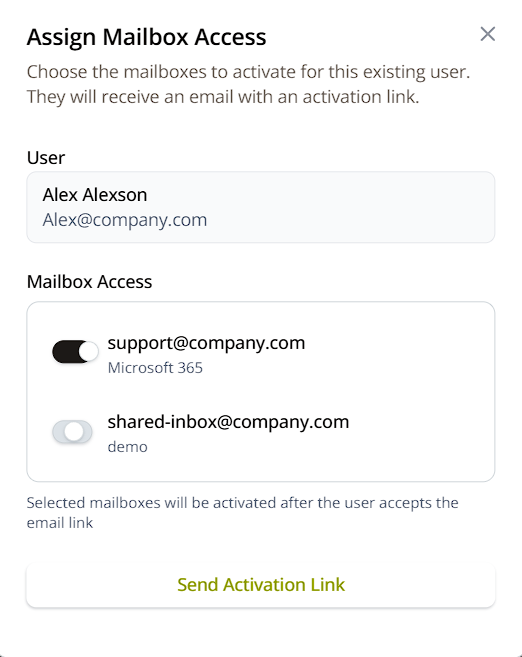
Access isn't live the moment you save it — the person gets an email with an activation link, and the mailboxes switch on once they follow it.
Changing someone's role
There's currently no way to change a role from the interface. The Role column is read-only, and the Assign mailboxes dialog only covers mailbox access, not the role itself. To move someone between Owner, Mailbox Admin, and Mailbox Member today, an Owner or Mailbox Admin has to remove them from the organization and invite them again with the role they should have.
Their mailbox assignments go with them, so make a note of what they currently have before deleting them — you'll be assigning it again after they accept the new invitation.
What's next
- Inviting Users: Bring Your Team into the Shared Workspace — how to assign a role and mailbox access when you invite someone.
- Connecting Microsoft 365 Shared Mailboxes — where an Owner grants Entra admin consent for the connector.